Affiliate Disclosure: Some links are affiliate links, meaning we may earn a commission if you purchase—at no extra cost to you. Prices and availability can change. We base our content on independent research, not direct input from manufacturers or utilities unless stated. Unless explicitly stated, we do not personally test every product. Our reviews are based on independent research, product documentation, and user/reviewer feedback.
Is It the Best Home Energy Monitor for the Money?
Quick Verdict
The Emporia Vue 3 is the best value home energy monitor for most homeowners. At $99–$199.99 (no subscription), it delivers real-time whole-home and circuit-level monitoring, solar support, and a genuinely useful app. The app has quirks and cloud dependence is a real limitation—but at this price, nothing else comes close.
★★★★☆ 4.3 / 5 — Recommended for most homes
Best for: Homeowners who want granular circuit data without a subscription
Skip it if: You want AI appliance detection or 100% local data control
What Is the Emporia Vue 3?
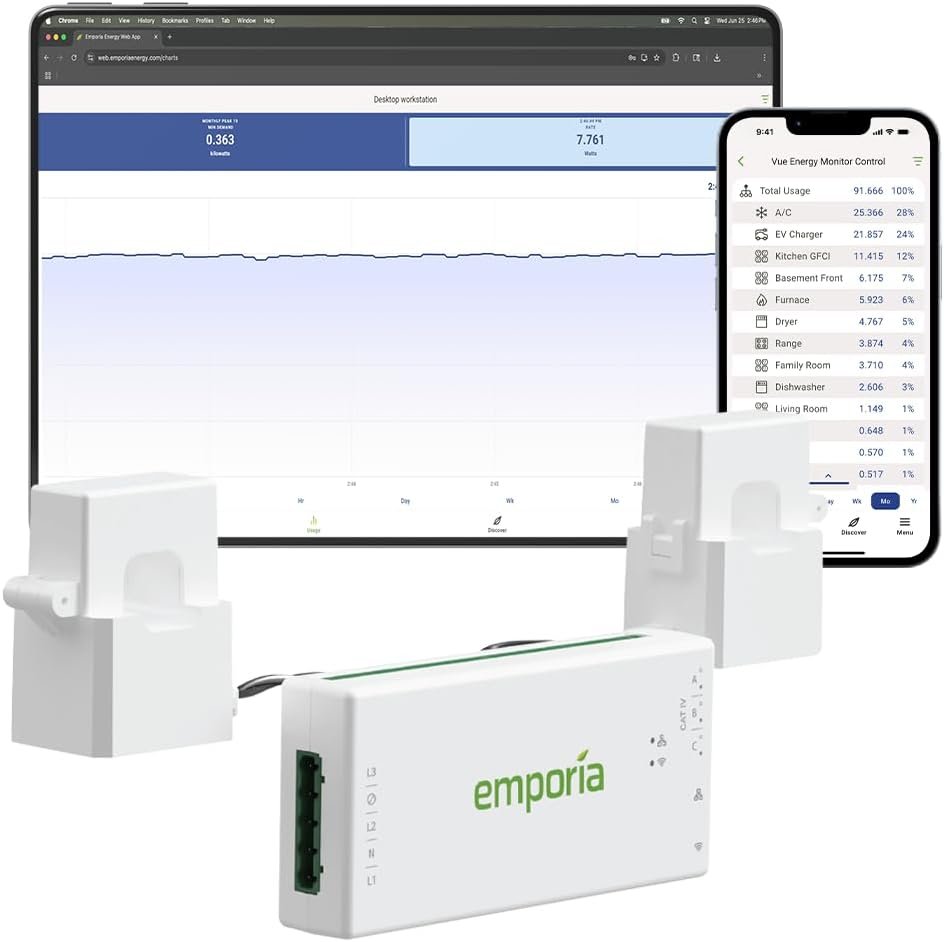
If you’ve ever opened an electricity bill wondering where all those kilowatt-hours went, the Emporia Vue 3 was designed specifically to answer that question. It’s a whole-home energy monitor that installs directly into your electrical panel, using clamp-on current transformers (CTs) to measure the electricity flowing through your mains and—if you add the circuit sensors—individual breakers.
Emporia released the Vue 3 in 2024 as an upgrade to their popular Vue 2, refining the hardware with better sensor connectors, a slimmer form factor, and expanded smart home integration. It’s now the top-selling energy monitor on Amazon and consistently recommended by energy-conscious homeowners.
This review covers everything you need to know: what’s in the box, how installation actually goes, what the app is like to live with, where it falls short, and who should (and shouldn’t) buy it.
Emporia Vue 3 Specs at a Glance
What’s in the Box
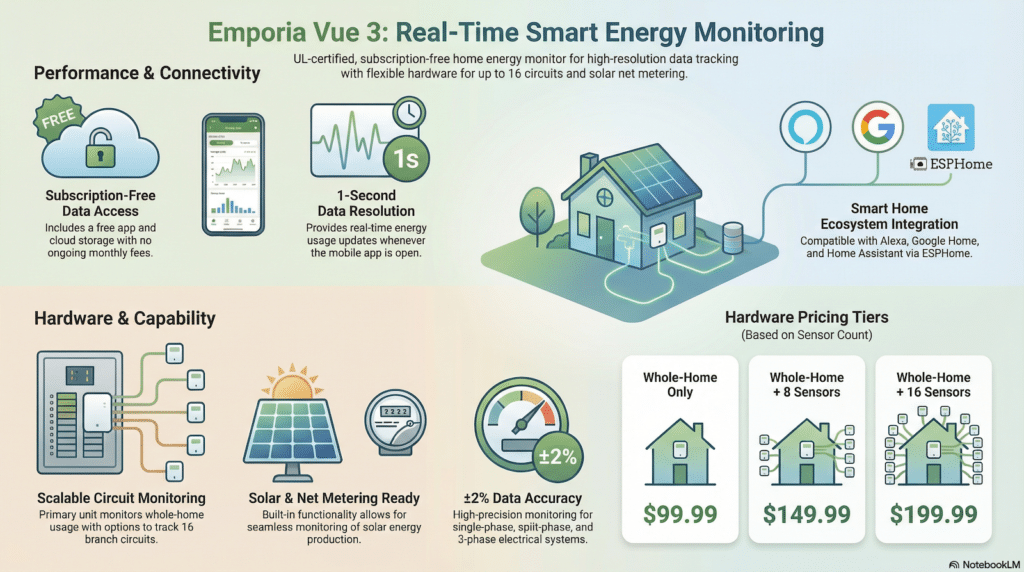
The Vue 3 comes in three configurations depending on how much circuit-level detail you want:
- Whole-Home Only ($99.99): The Vue 3 hub + two 200A main CT sensors. Tracks total home usage only.
- 8 Circuit Sensors ($149.99): Hub + two 200A mains CTs + eight 50A branch circuit CTs. Good for tracking your biggest loads (HVAC, water heater, dryer, etc.).
- 16 Circuit Sensors ($199.99): Hub + two 200A mains CTs + sixteen 50A branch circuit CTs. Full circuit-level coverage for most single panels.
All packages include the hub device, CT sensor clamps, wire harness, mounting hardware, and a printed installation guide. The Vue 3’s CT wires use screw-terminal (Molex) connectors—an upgrade over the Vue 2’s audio-jack connectors—and the wires can be trimmed to reduce panel clutter.
Installation: Easier Than You’d Expect, With a Caveat
The Vue 3 installs inside your main electrical panel. You clip the two large CT sensors around your mains (the thick wires feeding into your panel), clip the branch CTs around individual breaker wires, snap the hub into place, and connect it to your home Wi-Fi via the Emporia app. No cutting of wires is required.
The hardware side is genuinely approachable for a confident DIYer. The clamp-on design is non-invasive, the wiring is clearly labeled, and the updated screw terminals on the Vue 3 are more reliable than the snap-in connectors on the previous generation. Real users report clean installs even in crowded panels, thanks to the slimmer profile and wires that exit from only three sides.
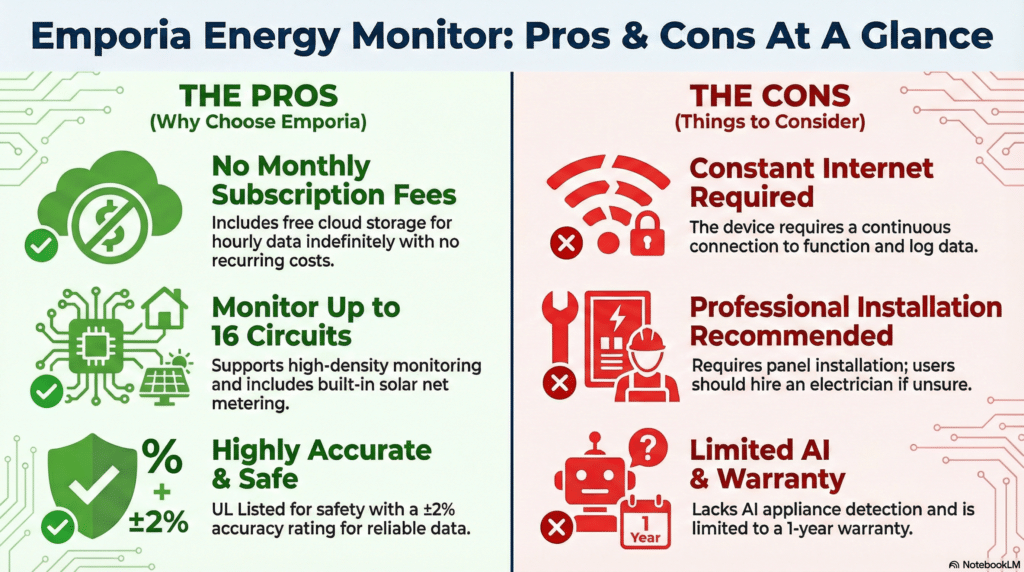
That said, you are working inside a live electrical panel. Emporia includes DIY instructions but strongly recommends hiring a licensed electrician. If you’re not comfortable turning off your main breaker and working around service conductors—which stay live even with the main off—hire a pro. Installation typically runs $100–$200.
⚠️Safety Reminder Even with the main breaker off, the service conductors entering your panel remain live. Only a licensed electrician should work near these. When in doubt, hire out.
The Emporia App: Genuinely Useful, Some Rough Edges
The free Emporia app (iOS and Android) is where you’ll spend most of your time with the Vue 3. The home screen shows whole-home wattage in real time, updates every second while the app is open, and lets you drill into individual circuits to see exactly what they’re drawing.
What the App Does Well
- Real-time usage visualization: Watching your HVAC compressor kick on and spike 3,500W is surprisingly satisfying—and genuinely useful for understanding your biggest loads.
- Historical trends: Daily, weekly, and monthly breakdowns let you spot patterns like a phantom load that runs overnight or a fridge compressor that’s cycling too often.
- Cost tracking: Enter your utility rate and the app converts kWh into dollars, so you can see your bill building in real time.
- Solar net metering: If you have solar, the app overlays generation vs. consumption so you can see how much you’re exporting vs. using.
- Alerts and automations: Get notified if a circuit exceeds a threshold (great for catching a sump pump that won’t stop running), and set time-of-use schedules for compatible smart devices.
- AI Energy Assistant: A newer feature that lets you ask plain-language questions about your usage data—”Which circuit used the most power last week?”—and get direct answers.
Where the App Falls Short
- 1-second data is conditional: The Vue 3 advertises 1-second resolution, but that only applies when the app is actively open on your screen. Background updates drop to 1-minute intervals. Users looking for high-resolution power profiling (e.g., for solar sizing) have noted this limitation.
- Limited notifications: You can’t set up granular alerts for all appliance types. For example, Emporia only supports one device configured as a cooktop/range per monitor—a genuine annoyance if you want to monitor multiple cooking appliances.
- Sub-panel visualization: Homes with sub-panels can’t cleanly nest circuits in the app’s display (though Emporia has indicated a fix is in development for 2026).
- Cloud-only: The app requires an active internet connection at all times. There is no local data storage and no local processing mode. If your Wi-Fi goes down or Emporia’s servers are offline, you lose access to your data.
Pros and Cons
Emporia Vue 3 vs. Vue 2: What Actually Changed?
If you have the older Vue 2 and are wondering whether to upgrade, here’s the honest answer: the Vue 3 is a refinement, not a revolution. The core functionality is the same. What changed:
| Feature | Vue 2 | Vue 3 |
|---|---|---|
| CT Connectors | Audio-jack (can loosen) | Screw terminals (Molex) — more reliable |
| Wire Length | Fixed length | Trimmable — cleaner panel install |
| Form Factor | Standard | Slimmer, DIN rail mounting |
| Smart Home | Alexa, Google | Adds Home Connect (Bosch appliances) |
| ESPHome Support | Yes | Yes |
| Data / App | Same | Same core platform |
Verdict: If you already have a working Vue 2, there’s no urgent reason to upgrade. If you’re buying new, get the Vue 3.
Who Should Buy the Emporia Vue 3?
Great fit if you:
- Want to know exactly which circuit (HVAC, water heater, dryer, EV charger) is costing you money
- Have solar panels and want to track net metering
- Use Home Assistant and want local control via ESPHome
- Don’t want to pay a monthly subscription
- Are comfortable doing a DIY electrical panel install or hiring an electrician
Consider something else if you:
- Want appliance-level identification without adding circuit sensors (look at Sense)
- Need your data to work offline or locally without cloud dependency (look at alternatives like Refoss or flash the Vue 3 with ESPHome)
- Are renting and can’t access your electrical panel
- Have a 3-phase commercial system (Emporia makes a Vue 3 3-Phase version for this)
What Real Users Say
The Vue 3 holds a 4.6-star rating on Amazon and is well-regarded by the DIY solar and home automation communities. Common praise:
- “Within days of installing, I knew I needed to replace my upstairs AC and my garage refrigerator. Those two items account for 40% of my energy usage. Spending $200 saved me from replacing the wrong thing.” — Amazon reviewer
- Users frequently report discovering energy hogs they never suspected, from constantly-running sump pumps to always-on appliance standby draws.
- The screw-terminal sensor connections on the Vue 3 are consistently praised as an improvement over the Vue 2’s audio jacks.
Common complaints from power users:
- The 1-second data resolution is only available when the app is actively open—background operation reverts to 1-minute polling.
- The cloud-only architecture is a concern for privacy-conscious users and those who want data to survive a service outage. (The ESPHome workaround addresses this for technical users.)
- The app’s subpanel visualization can be confusing for complex multi-panel setups.
Final Verdict
The Emporia Vue 3 is the best value home energy monitor for most homeowners. No subscription. Circuit-level precision. Solar support. A polished enough app to make the data actionable. The cloud dependency and limited offline capability are real limitations—but for a device that starts at $99.99 and gives you granular insight into every circuit in your home, it’s hard to argue with the value proposition.
Rating: ★★★★☆ 4.3 / 5
Score Breakdown
| Category | Score | Notes |
|---|---|---|
| Value for Money | 5/5 | Best price in the category |
| Hardware Quality | 4.5/5 | Improved connectors, slim design |
| App & Software | 3.5/5 | Useful but cloud-dependent, some quirks |
| Accuracy | 4.5/5 | ±2%, consistent with utility bills |
| Installation | 4/5 | DIY-friendly hardware, but panel work requires care |
| Solar Support | 4.5/5 | Built-in net metering, no add-ons needed |
Frequently Asked Questions
Does the Emporia Vue 3 require a subscription?
No. The app, cloud storage, and all monitoring features are completely free. There is no subscription fee.
Can the Emporia Vue 3 work without the internet?
Not out of the box. The Vue 3 requires an active internet connection to function. However, tech-savvy users can flash the device with open-source ESPHome firmware, which enables full local operation and Home Assistant integration without cloud dependency.
Does it work with solar panels?
Yes. Solar net metering is built into the Vue 3 at no extra cost. The app can show how much energy your solar system is generating, how much you’re using, and how much you’re exporting to the grid.
How many circuits can the Vue 3 monitor?
A single Vue 3 unit can monitor up to 16 individual branch circuits, plus the two main lines. If you have more than 16 circuits to monitor (or multiple panels), you can pair multiple Vue units in the Emporia app for a unified view.
Is the Vue 3 compatible with Home Assistant?
Yes, but not natively. You need to flash the Vue 3 with ESPHome firmware to get proper local Home Assistant integration. Once flashed, you get fast local data without cloud dependency. The process requires some technical comfort but is well-documented by the community.
How accurate is the Emporia Vue 3?
Emporia rates the Vue 3 at ±2% accuracy, which is comparable to a utility-grade meter. Real-world user reviews generally confirm that the Vue 3’s readings align closely with actual utility bills.
Can I install it myself?
The hardware installation is DIY-friendly—the clamp-on sensors don’t require cutting any wires. However, you’re working inside a live electrical panel, and the service conductors entering your panel remain energized even when your main breaker is off. Emporia recommends hiring a licensed electrician if you’re not completely comfortable with this type of work.
Related Reviews
- Best Home Energy Monitors of 2026 — See how the Vue 3 ranks against Sense, Eyedro, and others
- Sense Energy Monitor Review — Is AI-based appliance detection worth the premium?
- Emporia Vue 3 vs. Sense — Head-to-head comparison
Affiliate Disclosure: Some links are affiliate links, meaning we may earn a commission if you purchase—at no extra cost to you. Prices and availability can change. We base our content on independent research, not direct input from manufacturers or utilities unless stated. Unless explicitly stated, we do not personally test every product. Our reviews are based on independent research, product documentation, and user/reviewer feedback.